 Login
Login
Microsoft Teams Integration Licensing Requirements
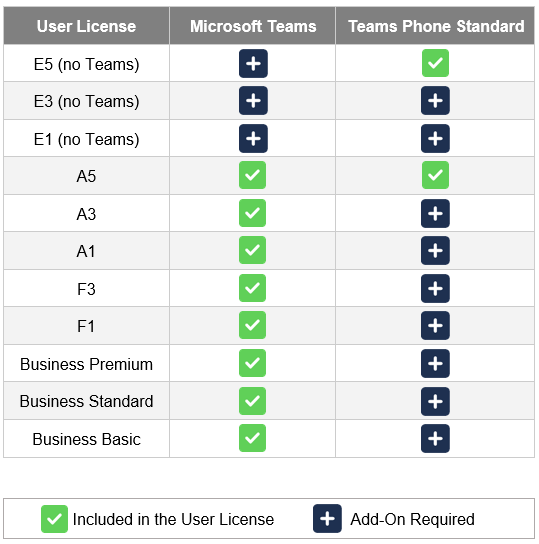
In order for your Microsoft Teams users to make and receive calls using their Teams app and MaxoTel Teams Integration, they require appropriate licensing be assigned in Microsoft 365. Depending on your plan, Microsoft may charge extra for Microsoft Teams or Teams Phone add-ons.
Compatible Licenses
License combinations compatible with the MaxoTel Teams Integration are as follows:
Direct Routing Only:
| Account Type | License | Note |
|---|---|---|
| Resource Account (including Teams Queues, IVRs) | Teams Resource Account | This license type can not be used for the initial integration setup |
Ordering Licenses and Addons
License management is done through the Microsoft 365 Admin Centre at https://admin.microsoft.com
If an add-on license is required, you must license the user first before attempting to order the add-on license.
To order new or additional licenses, select Billing > Purchase Services. You may need to select the 'Show More' dots before this item is visible.
Once the appropriate licenses have been ordered, they can be assigned to the desired users by selecting Users > Active Users.
For additional help in managing your Office 365, please contact your Office 365 service provider or click Help and Support at the bottom right of the Microsoft Admin Centre
 Australian Sales team about our phone system plans?