 Login
Login

Managing Teams User Linking
Before your Teams users can make and receive calls, they first need to be linked to an extension (Hybrid PBX) or a phone number (Direct Routing).
Changes to Teams user linking may take up to 4 hours to replicate. If you haven't seen your changes apply, you may need to sign out and back in to your Microsoft Teams App.
To show the relevant instructions, click your Teams Integration type:
Hybrid PBX
Reviewing Users
You can quickly see which of your PBX extensions are linked to a Microsoft Teams user by logging into https://my.maxo.com.au/ and selecting PBX Extensions
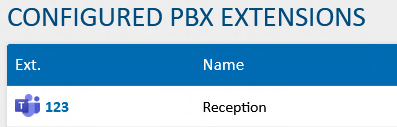
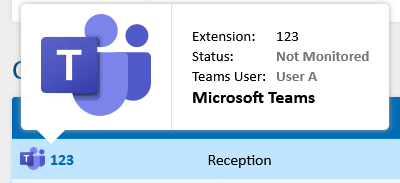
Hovering over the Teams icon will display which Teams user is linked to the extension.
Linking a User
When using Hybrid PBX, your Teams users are linked to a PBX Extension.
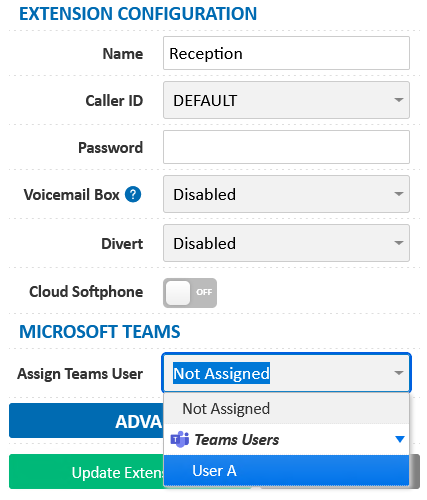
Login to https://my.maxo.com.au/ and select PBX Extensions, then locate the extension you wish to link and click Edit.

Select your desired user from the Microsoft Teams User dropdown, then click Update Extension
De-Linking a User
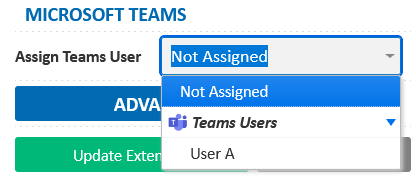
To remove a Teams user's link with a PBX extension, choose PBX Extensions, locate their PBX extension and click Edit. From the Assign Teams User dropdown, select either another user or not assigned depending on your requirement, then click Update Extension.
Note: A delinked user will no longer be able to make or receive phone calls, unless re-linked.
Teams User/s Are Missing
If you're not seeing all your users when attempting to link them, there may be a few reasons:
- The user is already linked to another phone number or PBX extension. De-link them from the original extension first, then retry.
- If your Teams user was only recently added or licensed, it make take up to 15 minutes before Microsoft reflect the changes. You may need to refresh your available users, per the below.
- Your user may not have the appropriate licensing. To see compatible licensing types, see Microsoft Teams Integration Licensing Requirements. Once licensed, you may need to refresh your available users per the below.
Refreshing Your Available Teams Users
If you have added, removed or licensed additional Teams users, we may need to retrieve an updated user list from Microsoft. To do so:
Hybrid PBX: Select Hosted PBX > Apps and Integrations, then Microsoft Teams, and click Refresh Teams Users
Direct Routing: Select Other Services > Apps and Integrations, then Microsoft Teams, and click Refresh Teams Users
 Australian Sales team about our phone system plans?